Recommended versions
We recommend using Adobe Lightroom Classic LTS 14.5 and Photoshop LTS 26.11 for benchmarking with Procyon Photo Editing. The latest supported Adobe versions are Lightroom Classic 15.5 and Photoshop 27.9.1.
Graphics Preference Setting
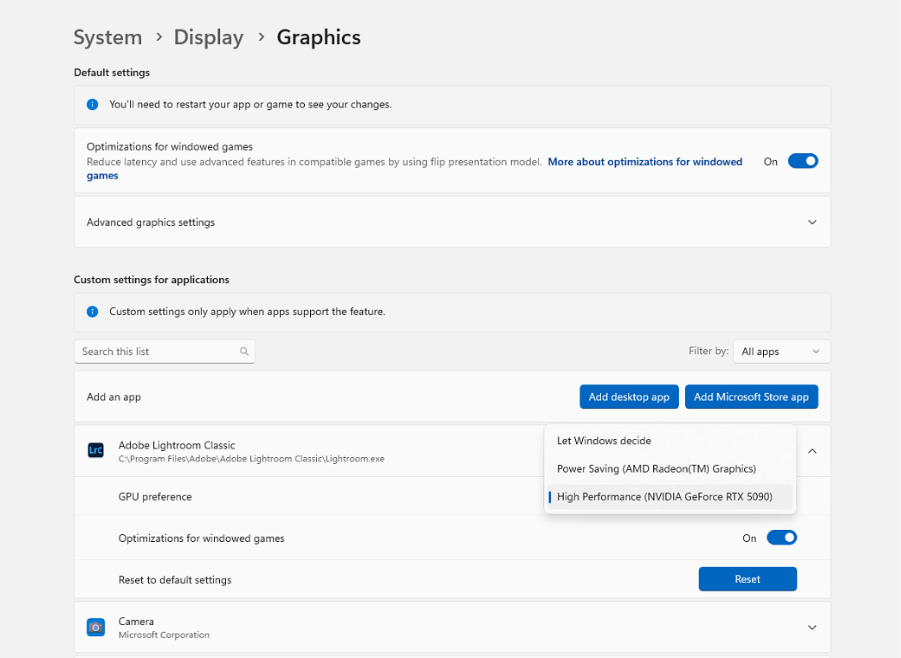
Due to Windows 11 automatically setting graphics preference for graphics performance on mshybrid systems (systems with both an integrated and discrete GPU), we recommend that you set the following applications to use the “High performance” graphics preference to get consistent benchmarking results that represent maximum performance
- Light Room Classic
- Photoshop
This can be achieved with the following steps. Please note that the exact method may vary slightly based on your version of Windows 11:
- Open the Settings application > Display > Graphics.
- Under “Custom options for apps” click the “Browse” button
- Navigating to your install folder for the application. The default install locations are the following:
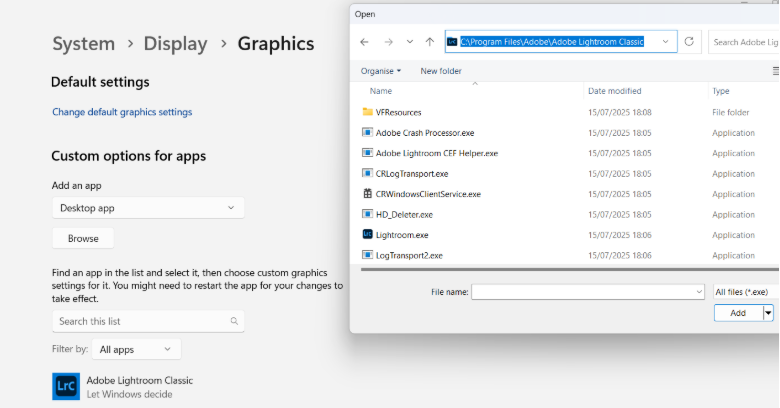
- Lightroom Classic
C:\Program Files\Adobe\Adobe Lightroom Classic - PhotoShop
C:\Program Files\Adobe\Adobe PhotoShop
- Lightroom Classic
- Click the “.exe” launch file for the selected program and “Add”
- Click on the application in the list below, then “Options”
- Select “High performance” and save